Watch App Guide
Apple Watch Dive Computer

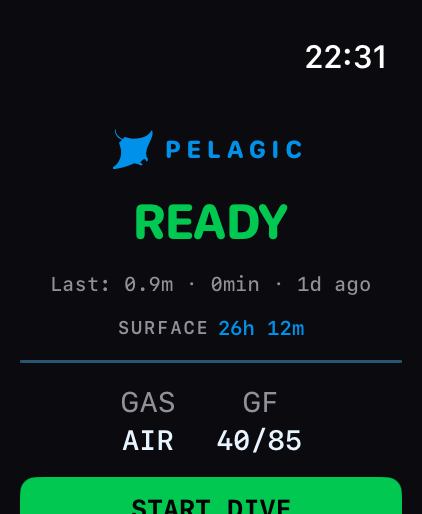
The Pelagic Watch app turns your Apple Watch Ultra into a standalone dive computer. It uses the watch's EN13319-certified depth sensor and runs the Bühlmann ZHL-16C decompression algorithm — the same algorithm used in professional dive computers.
Safety notice: Always dive within your certification limits. This app is designed for recreational diving to 40m. Always follow PADI/BSAC safety guidelines and never dive alone.
First Launch
When you open Pelagic for the first time, the splash screen appears briefly, followed by a system prompt asking you to set Pelagic as your water activity app.
Water Activity Setup
watchOS shows a one-time system prompt: "Use Pelagic when submerged in water?"
Tap Use Pelagic to set it as your default water activity app. This allows the watch to automatically launch Pelagic when submerged. You can change this later in the Watch Settings app under Water Activity.
This prompt only appears once. If you dismiss it, go to Settings → General → Water Activity on your Apple Watch to change the setting later.
Navigation Model
The Watch app is designed for one-handed underwater operation. All navigation uses the Action button and Digital Crown — no swiping.
| Input | Action | Context |
|---|---|---|
| Action button (short press) | Cycle screens | During dive: Dive → Gas → Compass → Dive |
| Action button (long press) | End dive confirmation | Active dive only |
| Double press Action | Toggle screen lock | Active dive — prevents accidental input |
| Digital Crown (rotate) | Adjust values | Pre-dive setup screens |
| Digital Crown (press) | Back / confirm | Settings and setup screens |
| Tap START DIVE | Begin dive | Surface dashboard |
Swipe gestures are intentionally disabled during an active dive — wet hands and gloves make accidental swipes likely.
Surface Dashboard
The home screen shown when you're on the surface. Shows everything you need before entering the water.
UI Elements
| Element | Description |
|---|---|
| Manta logo + PELAGIC | App wordmark in the header |
| READY / Last dive | Status indicator. If a previous dive exists: shows max depth, duration, and how long ago |
| Surface interval | Time since last dive (persisted across app restarts). Shows when within 24h of a dive |
| ✈️ No-fly warning | Amber banner if flying is restricted after a recent dive. Shows hours remaining |
| ⚠️ Altitude warning | Shows if barometric pressure indicates altitude >300m — altitude diving requires adjusted tables |
| Gas row | Current gas configuration. Tap to open Gas Setup |
| GF row | Current gradient factor setting. Tap to adjust conservatism |
| START DIVE | Begins the dive. Also activatable via Action button |
| ▶ Simulate Dive | Simulator only — runs a mock 36-minute dive for testing |
Gas Setup
Tap the gas row on the surface dashboard to configure your breathing gas before a dive. Always set your gas before entering the water.
Gas presets
| Preset | O₂% | MOD at 1.4 PO₂ | Use for |
|---|---|---|---|
| Air | 21% | 56.7m | Standard recreational diving |
| EAN32 | 32% | 33.8m | Recreational nitrox — more bottom time at 20–30m |
| EAN36 | 36% | 28.9m | Nitrox for shallower dives, max ~28m |
| Custom | 21–40% | Calculated live | Any analysed blend |
PO₂ limit
Maximum Oxygen Partial Pressure. Determines your Maximum Operating Depth (MOD) for nitrox.
| Setting | Use |
|---|---|
| 1.2 atm | Conservative — IANTD recommendation for extended time |
| 1.4 atm (default) | PADI/BSAC standard recreational limit |
| 1.6 atm | NOAA maximum — use with caution |
Exceeding the MOD triggers a continuous haptic alert. This is a safety-critical limit — always know your MOD before diving with nitrox.
Conservatism Settings
Conservatism adjusts the Gradient Factor (GF) parameters, which control how cautiously the Bühlmann algorithm calculates decompression limits.
| Level | GF Low | GF High | Effect on NDL |
|---|---|---|---|
| +2 (most conservative) | 20 | 70 | Significantly shorter NDLs — extra safety margin |
| +1 | 30 | 75 | Moderately shorter NDLs |
| 0 (default) | 40 | 85 | Standard recreational limits |
| −1 | 50 | 90 | Slightly longer NDLs |
| −2 (least conservative) | 60 | 95 | Longest NDLs — experienced divers only |
The default (0) is appropriate for most recreational divers. If you're doing multiple dives per day, consider +1 or +2.
Altitude Mode
Pelagic automatically detects altitude via the watch's barometric sensor. At altitudes above approximately 300m, standard sea-level decompression tables are no longer accurate.
When altitude is detected, an ⚠️ banner appears on the surface dashboard. The algorithm automatically adjusts the surface pressure value used in tissue loading calculations.
Altitude diving requires specific training. If you're diving at altitude, ensure you have appropriate certification and are using corrected dive tables.
Primary Dive Screen
The main screen during an active dive. Shows everything critical at a glance.
| Element | Location | Description |
|---|---|---|
| Depth | Centre, large | Current depth in metres. Updated every second. Largest element on screen. |
| Ascent rate | Top left | Current vertical speed in m/min. Arrow indicates direction. Turns red if >9m/min. |
| Temperature | Top right | Water temperature in °C from the depth sensor |
| Heart rate | Top right (alternates) | Current heart rate in BPM if HealthKit authorised. ♥ icon. |
| NDL | Bottom left | No Decompression Limit in minutes. Colour-coded by safety state. |
| TIME | Bottom centre | Elapsed dive time in MM:SS |
| MAX | Bottom right | Maximum depth reached this dive |
| NDL bar | Bottom strip | Visual NDL countdown — drains left to right as limit approaches |
Colour States
Colour communicates safety state — no need to read numbers to understand your situation.
| Colour | NDL State | Meaning |
|---|---|---|
| ■ Green | NDL >20 min | Safe — plenty of bottom time remaining |
| ■ Amber | NDL 10–20 min | Be aware — start thinking about ascending |
| ■ Red | NDL <10 min | Urgent — begin ascent shortly |
| ■ Purple | Deco obligation | Mandatory decompression stop required |
| ■ Red (ascent) | Ascent rate >9m/min | Slow down — ascending too fast is dangerous |
Deco Stop Screen
Shown automatically when a decompression obligation is triggered (NDL exceeded). The screen border pulses purple and a triple haptic fires.
Critical: If this screen appears, you must complete the required stop before surfacing. Surfacing without completing a deco stop significantly increases DCS risk.
| Element | Description |
|---|---|
| DECO STOP | Header in purple — mandatory stop required |
| Stop depth | Minimum depth for the required stop in metres |
| Stop time | Minutes remaining at the stop depth. Counts down. |
| Progress bar | Purple bar draining as stop time is completed |
| CEILING | Minimum safe depth — do not ascend above this |
| DEPTH | Current depth |
| TTS | Total Time to Surface including all deco stops |
| DEBT | Decompression obligation accumulated |
Gas Screen
Shows gas information during the dive. Access via Action button (short press from dive screen).
| Element | Description |
|---|---|
| Gas name | AIR, EAN32, EAN36, or custom O₂% |
| O₂% | Oxygen fraction of your gas |
| MOD | Maximum Operating Depth. Turns red if current depth exceeds it. |
| PO₂ | Current oxygen partial pressure at present depth. Warn at 1.4, danger at 1.6. |
| CNS% | Central Nervous System oxygen toxicity accumulation. Warn at 75%, danger at 100%. |
Compass Screen
Digital compass with bearing lock for underwater navigation. Access via Action button from the gas screen.
| Element | Description |
|---|---|
| Compass rose | N/S/E/W with intermediate points. Rotates with heading. |
| Heading | Current magnetic heading in degrees and cardinal direction |
| SET BEARING | Tap to lock current heading as your return bearing |
| Deviation arrow | When bearing locked: shows ← or → and degrees off course. Amber if >5°. |
To navigate out and back: set bearing on descent, follow the arrow back to your starting point. The reciprocal bearing (180° opposite) gets you home.
Screen Lock
Double press the Action button to lock the screen during a dive. A lock overlay appears, preventing accidental button presses.
To unlock: tap and hold the screen for 2 seconds. The lock overlay will dismiss.
Use screen lock when wearing thick gloves or during periods of high activity where accidental input is likely.
Alerts & Haptics
All safety alerts fire both visually and via the Taptic engine — so you know even if you can't see the screen.
| Alert | Haptic | Visual | Priority |
|---|---|---|---|
| Ascent rate >9m/min | Long continuous buzz | Red border flash | Critical |
| Emergency ascent detected | Repeated bursts | Full-screen red + "SLOW DOWN" | Critical |
| MOD exceeded | Continuous buzz | Full-screen red | Critical |
| Deco obligation triggered | Triple buzz + continuous | Purple pulsing border | Deco |
| NDL <5 min | Triple buzz | Red NDL pulsing | Urgent |
| NDL <10 min | Double buzz | NDL turns red | Warning |
| NDL <20 min | Single buzz | NDL turns amber | Advisory |
| Depth warning (38m) | Triple buzz | Warning banner | Warning |
| Safety stop reminder (5m) | Single buzz | Safety stop screen | Info |
| Low battery (<20%) | Single buzz | Battery icon warning | Advisory |
Safety Stop
When you ascend through 5m (configurable), the Safety Stop screen appears automatically with a 3-minute countdown.
| Element | Description |
|---|---|
| SAFETY STOP | Header in green |
| Depth | Current depth — stay at 5m (or your configured depth) |
| Countdown | Large timer counting down from 3:00. Green ring drains clockwise. |
| DIVE TIME | Total elapsed dive time at the bottom |
The safety stop is not mandatory (unlike a decompression stop) but is strongly recommended after any dive below 10m. It allows excess nitrogen to off-gas safely.
Dive Summary
Shown immediately after ending a dive. Review your stats and begin the surface interval.
| Element | Description |
|---|---|
| Manta logo | DIVE COMPLETE header in green |
| MAX DEPTH | Maximum depth reached |
| DURATION | Total dive time |
| AVG DEPTH | Average depth throughout the dive |
| TEMP | Water temperature |
| SAFETY STOP | ✓ (green) or ✗ (red) — whether safety stop was completed |
| MAX ASCENT | Fastest ascent rate during the dive. ✓ if ≤9m/min, ⚠️ if exceeded |
| ✈️ NO-FLY | Hours until safe to fly |
| SURFACE interval | Timer counting up from zero |
| NEW DIVE | Returns to surface dashboard for another dive |
No-Fly Time
After any dive, you must wait before flying. This is calculated from your tissue nitrogen loading.
- Minimum 18 hours after any dive
- Longer after deep or multiple dives
- Shown on the dive summary screen and surface dashboard
- Amber warning banner on surface dashboard until restriction clears
DAN and PADI recommend a minimum 18-24 hour surface interval before flying. Always follow your training agency's guidelines — Pelagic's calculation is a guide, not a substitute for proper training.
iPhone Sync
When a dive ends, Pelagic automatically sends the dive summary to the iPhone companion app via WatchConnectivity. This includes all stats and the depth profile.
The dive appears in your iPhone logbook with a ⌚ badge indicating it was synced from the Watch. You can then add a site name, notes, buddy, and rating on your iPhone.
Sync requires the iPhone app to be installed. If your iPhone isn't in range, the dive is queued and sent next time the watch is near your iPhone.
Bühlmann ZHL-16C Algorithm
Pelagic uses the Bühlmann ZHL-16C decompression algorithm with Gradient Factors — the same algorithm used in Shearwater, Subsurface, and most modern dive computers.
How it works
Your body absorbs nitrogen under pressure while diving. The algorithm models this using 16 parallel tissue compartments, each representing a different body tissue with a different rate of nitrogen absorption and elimination. When you ascend, it calculates the minimum safe ascent rate to prevent decompression sickness.
Gradient factors
Gradient Factors (GF Low / GF High) are safety margins applied to the raw Bühlmann limits. Lower values = more conservative = shorter NDLs = greater safety margin. See Conservatism Settings for the mapping.
Nitrox calculation
With nitrox, the nitrogen fraction is lower (oxygen replaces nitrogen), so tissues load nitrogen more slowly → longer NDLs at the same depth. However, higher oxygen partial pressure creates oxygen toxicity risk, managed via the MOD and CNS tracking.
Hardware Requirements
| Requirement | Details |
|---|---|
| Apple Watch model | Apple Watch Ultra or Ultra 2 — depth sensor required (EN13319 certified) |
| watchOS version | watchOS 10 or later |
| iPhone (for logbook) | iPhone with iOS 17 or later |
| Max depth | 40m (recreational limit). Apple Watch Ultra is rated to 100m. |
Pelagic only works on Apple Watch Ultra and Ultra 2. Other Apple Watch models do not have a depth sensor and cannot be used for diving.
Limitations & Safety
- For recreational diving only — max 40m, no mandatory decompression intended
- Not certified for technical diving, cave diving, or wreck penetration
- Single gas only in v1.0 — multi-gas support coming in a future version
- No tank transmitter integration in v1.0 — air integration is manual
- Heart rate monitoring is informational only — not used in decompression calculation
- GPS position is recorded at the surface only — not tracked underwater
- Ensure your Apple Watch Ultra is fully charged before every dive (≤40% battery per 60-minute dive)
- Always carry a backup dive computer when using any app-based dive computer
Important: Pelagic is a tool to assist qualified divers. It does not replace proper dive training. Always dive within your certification limits and with a buddy.